Names, Not IPs: How Mesh DNS and Split DNS Work
Reach your servers by name over a mesh VPN — gitlab.meshr instead of 100.78.0.101 — and forward private domains like redmine.internal to an internal resolver, all without hijacking your global DNS.
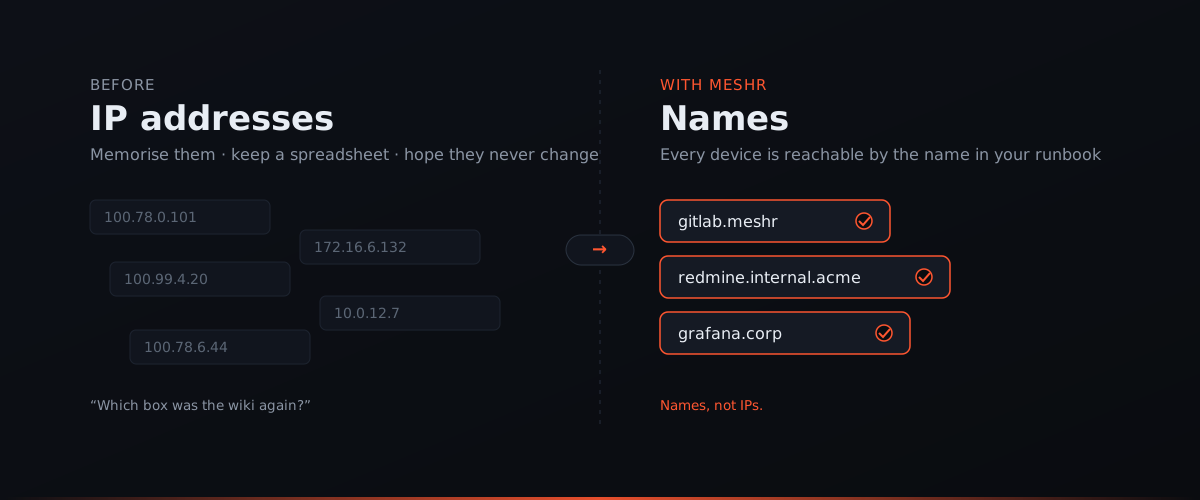
Every network eventually collides with the same annoyance: nobody wants to memorise IP addresses. Your runbook says redmine.internal.acme. Your monitoring dashboard lives at grafana.corp. Your CI box is gitlab — not 100.78.0.101, not 172.16.6.132. Yet the moment you connect over a VPN, those friendly names often stop resolving, and you’re back to copying numbers out of a spreadsheet.
meshr solves this with two cooperating pieces of DNS — Mesh DNS for your devices and Split DNS for your private domains — built on one firm principle: never take over your global resolver. Let’s walk through both, with pictures.
Mesh DNS: automatic device names
When a device joins your mesh, meshr gives it a name automatically. A machine called gitlab becomes reachable at gitlab.meshr from every other device in the network — no zone files, no manual /etc/hosts edits, no DNS server to stand up.
ssh gitlab.meshr
curl http://grafana.meshr:3000
Behind the scenes, gitlab.meshr resolves to that peer’s mesh IP. But you never see the IP, and — more importantly — you never care about it. If the device reconnects and its address shifts, the name keeps working. The name is the stable handle; the address is an implementation detail meshr manages for you.
This is the everyday win: the names your team already says out loud just work, on every device, the moment it joins.
Split DNS: private domains, precise forwarding
Mesh DNS covers devices inside the mesh. But most teams also run internal services behind their own DNS — an Active Directory zone, a Kubernetes cluster domain, an internal resolver that knows about *.internal.acme or *.corp. Those names don’t live in the mesh; they live on a resolver somewhere on your private network.
Split DNS (also called conditional forwarding) is how meshr reaches them. You tell meshr: for names matching *.internal.acme, ask this specific internal resolver; leave everything else alone.
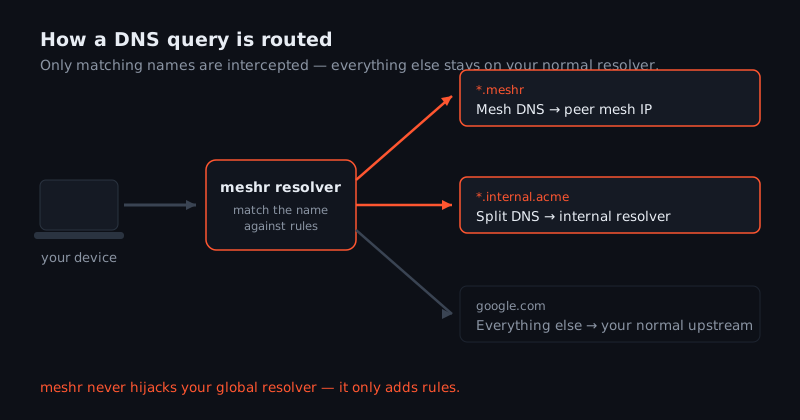
Here’s the design decision that matters most, and it’s the one many VPN clients get wrong:
meshr never hijacks your global resolver. It only adds rules for the domains you name. Everything else keeps flowing to whatever resolver you already use.
Concretely, when your device asks for a name:
gitlab.meshr→ Mesh DNS answers with the peer’s mesh IP.redmine.internal.acme→ Split DNS forwards the query to your internal resolver.google.com,github.com, your bank → your normal upstream resolver, exactly as before.
Your public browsing, your ISP or corporate DNS, your DNS-over-HTTPS setup — none of it is intercepted. meshr slots in beside your existing DNS to answer only the questions it’s responsible for. That means turning meshr on can’t silently break name resolution for the rest of the internet, and turning it off can’t strand you: the global path was never touched.
Nameserver groups: the object that ties it together
Split DNS is powerful, but you don’t want to hand-edit resolver settings on every laptop. So meshr wraps the rule in a single admin object called a nameserver group.
A nameserver group answers three questions:
- Which resolver? — the IP of the internal DNS server that knows your private zone (e.g.
10.0.0.53). - Which domains? — the match patterns that should go there (e.g.
*.internal.acme). - Which devices? — the distribution: apply it org-wide, or only to a selected set of devices.
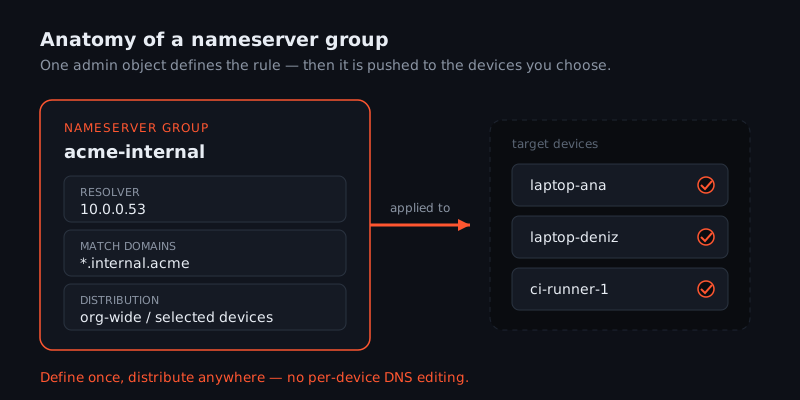
You define it once in the admin console, and meshr pushes the resolver configuration to exactly the devices you chose. Add a new laptop to the group later and it inherits the same rule automatically — no per-machine DNS editing, no drift between what the runbook says and what actually resolves.
The distribution control is what keeps Split DNS tidy. A contractor’s laptop doesn’t need to know about your internal zones; a production CI runner does. Nameserver groups let you scope private-domain resolution the same way you’d scope any other access — deliberately, per group of devices.
Putting it together
Say your team’s runbooks reference three kinds of names. With meshr configured, a single device resolves all of them without you touching its system DNS:
| You type | Resolved by | Goes to |
|---|---|---|
gitlab.meshr | Mesh DNS | the peer’s mesh IP |
redmine.internal.acme | Split DNS (nameserver group) | your internal resolver |
news.ycombinator.com | your normal upstream | the public internet, untouched |
The result is that the names in your documentation simply work — over the VPN, from anywhere — without those private names ever leaking to public DNS, and without meshr sitting in the path of your everyday browsing.
The bottom line
Good DNS on a VPN should feel invisible. Mesh DNS makes every device reachable by the name you already use. Split DNS, defined through nameserver groups, forwards your private domains to the resolver that owns them — and nothing else. The guiding rule underneath both is restraint: meshr answers only the names it’s responsible for and leaves your global resolver exactly where it was.
Ready to stop copying IPs out of a spreadsheet? Build a mesh for free and your devices get automatic names the moment they join.