meshr vs OpenVPN: real mesh vs. gateway mesh.
OpenVPN Access Server and CloudConnexa are genuine VPN competitors — but CloudConnexa’s "mesh" runs between OpenVPN’s own gateways, not your devices. Here’s an honest, feature-by-feature look at both.
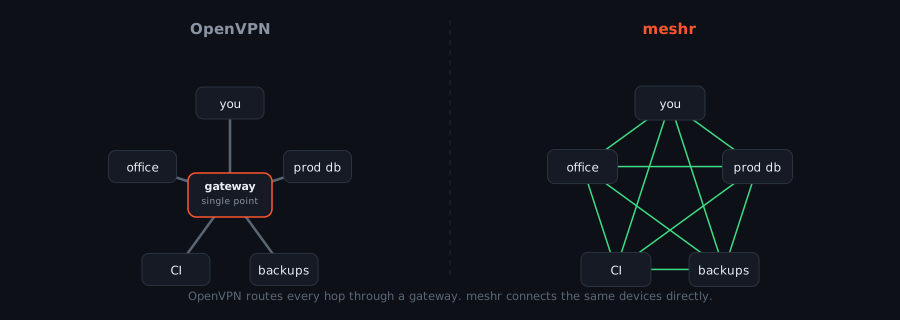
OpenVPN is actually two different products.
Both matter for this comparison, and they work differently.
Access Server — self-hosted gateway
A traditional hub-and-spoke VPN gateway you install yourself (Docker, Linux, VMware, Hyper-V). Site-to-site support, FIPS mode, and a long enterprise track record — licensed per simultaneous connection.
CloudConnexa — cloud-managed, gateway mesh
A cloud-only, no-self-host product. It markets a "Full-Mesh Topology," but per OpenVPN’s own comparison materials, that mesh connects their regional gateways — client devices still connect through a PoP, not directly to each other.
meshr vs OpenVPN, side by side.
Grounded in OpenVPN’s own public docs and pricing pages for Access Server and CloudConnexa.
| OpenVPN | meshr | |
|---|---|---|
| Topology | Hub-and-spoke gateway model (CloudConnexa’s mesh is between OpenVPN’s regional gateways, not client devices) | Full device-to-device mesh |
| Self-hosting | Access Server: yes (Docker, Linux, VMware, Hyper-V). CloudConnexa: cloud-only | Cloud-hosted today — self-hosted build on the roadmap |
| Protocol | OpenVPN protocol (SSL/TLS-based) | WireGuard |
| Authentication | SAML, LDAP, RADIUS, MFA | SSO (OIDC) + certificate-based device auth |
| Access control | Zero Trust ACLs (CloudConnexa, all tiers) | Identity + policy-based Zero Trust |
| DNS filtering / IDS-IPS | Included on all CloudConnexa tiers | Not part of meshr |
| Session recording | Not published for either product | Built-in, with a web SSH terminal |
| Pricing model | Two products, two models: per-seat (CloudConnexa) or per-simultaneous-connection (Access Server) | One per-user model across the whole product |
| Free tier | CloudConnexa Starter: 5 seats. Access Server: free up to 2 simultaneous connections | Free: 5 users, 50 devices |
| FIPS mode | Access Server: yes | Not published |
Pricing and feature details as published by OpenVPN Inc. for Access Server and CloudConnexa; subject to change on their end.
Where each one actually wins.
No product wins every row — here’s where OpenVPN genuinely has the edge, and where meshr does.
Where meshr wins
- A device-to-device mesh, not a gateway-to-gateway one — CloudConnexa’s “Full-Mesh Topology” still routes client traffic through OpenVPN’s own regional gateways.
- WireGuard’s codebase is far smaller than the OpenVPN protocol’s, which means less audited surface area and less protocol overhead to carry.
- Session recording and a web SSH terminal ship built in — neither is documented for Access Server or CloudConnexa.
- One per-user price across the whole product, instead of choosing between CloudConnexa’s per-seat billing and Access Server’s per-simultaneous-connection billing.
Where OpenVPN wins — honestly
- Access Server’s FIPS mode and roughly two decades of enterprise and government deployment history matter for regulated environments.
- The OpenVPN protocol has two decades of battle-tested reliability and the widest third-party client and router support of any VPN protocol.
- Access Server is genuinely self-hostable today — install it on your own Docker host or VM. meshr’s self-hosted option is still on the roadmap, not available yet.
Migrating off OpenVPN?
Run meshr alongside your Access Server or CloudConnexa deployment while you validate it — install the agent, confirm connectivity and policies, then retire the OpenVPN gateway once your team is ready. No rip-and-replace required.
curl -fsSL https://get.meshr.to/install.sh | sudo bashmeshr login -t <setup-key>meshr upmeshr vs OpenVPN FAQ.
Is CloudConnexa’s "Full-Mesh Topology" the same as meshr’s mesh?
No. By OpenVPN’s own comparison materials, CloudConnexa’s mesh is formed between OpenVPN’s regional gateways/PoPs — client devices connect to a PoP and traffic transits OpenVPN’s infrastructure. It is not peer-to-peer between your devices. meshr’s mesh connects devices directly to each other.
Can I self-host meshr the way I can self-host OpenVPN Access Server?
Not yet. Access Server can be deployed on your own Docker host, Linux box, VMware, or Hyper-V today. meshr is cloud-hosted right now, with a self-hosted build on the roadmap for Enterprise — if self-hosting is a hard requirement today, Access Server is the more mature option.
How does OpenVPN’s pricing compare to meshr’s?
OpenVPN splits pricing across two separate products with two different billing models: CloudConnexa bills per seat ($7–$9.50/seat/mo plus a custom Enterprise tier), and Access Server bills per simultaneous connection ($7/connection/mo on Growth). meshr uses one per-user model across a single product.
Does meshr include DNS filtering or intrusion detection like CloudConnexa?
No. CloudConnexa includes DNS filtering and IDS/IPS on every tier; meshr does not currently offer these. If content/threat filtering at the network layer is a requirement, that’s a genuine gap today.
Is switching from OpenVPN to meshr a big migration?
You can run meshr alongside OpenVPN while you validate it — install the agent, test connectivity and policies, then retire the OpenVPN gateway once your team is confident. See the migration steps below.
Try a real device-to-device mesh.
Start with a free account. No credit card required.
# Get connected in 3 commands
$ curl -fsSL https://get.meshr.to/install.sh | sudo bash
$ meshr login -t <setup-key>
$ meshr up

✓ Connected! IP: 10.0.0.5
✓ DNS: my-server.meshr
✓ SSH: meshr ssh my-server